Passwordless Login
The passwordless login is implemented on top of the OAuth2 "authorization code flow", so you need to create an OAuth client first.
Here is a (react) example app, if you want to see some code: https://github.com/sun-labs/cloudgarden-passwordless-react-example-with-pkce.
How it works
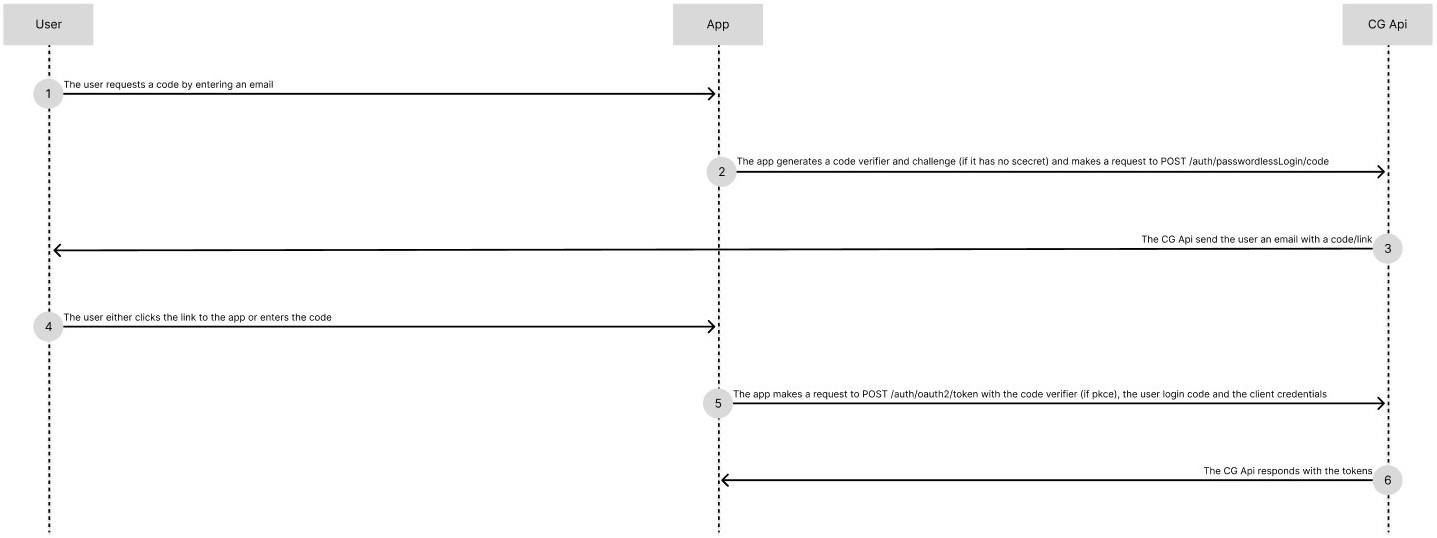
- Create an OAuth client (see).
- Collect the user's email address-
- Generate the needed pkce data. You can read here how and when to do this.
- With the users
email, thecode_challenge, thecode_challenge_method, andredirect_uri(this is used to construct the login-link and has to match one of theredirectUrivalues of the client) callPOST /auth/passwordlessLogin/code. - Collect the login code either via input or using the login link, which will have a query parameter
code, which contains the login code. - With the login-code, the client credentials,
grant_typeset toauthorization_code, and the "code verifier" (if pkce), make a request toPOST /auth/oauth2/token - You'll receive a response with the tokens.
Token response example
{
    "access_token": "ey...",
    "refresh_token": "c9...",
    "expires_in": 900,
    "token_type": "Bearer"
}