Email configuration
Settings
You can customize the following email settings.
info
EMAIL_TYPE refers to EMAIL_TYPE in this section
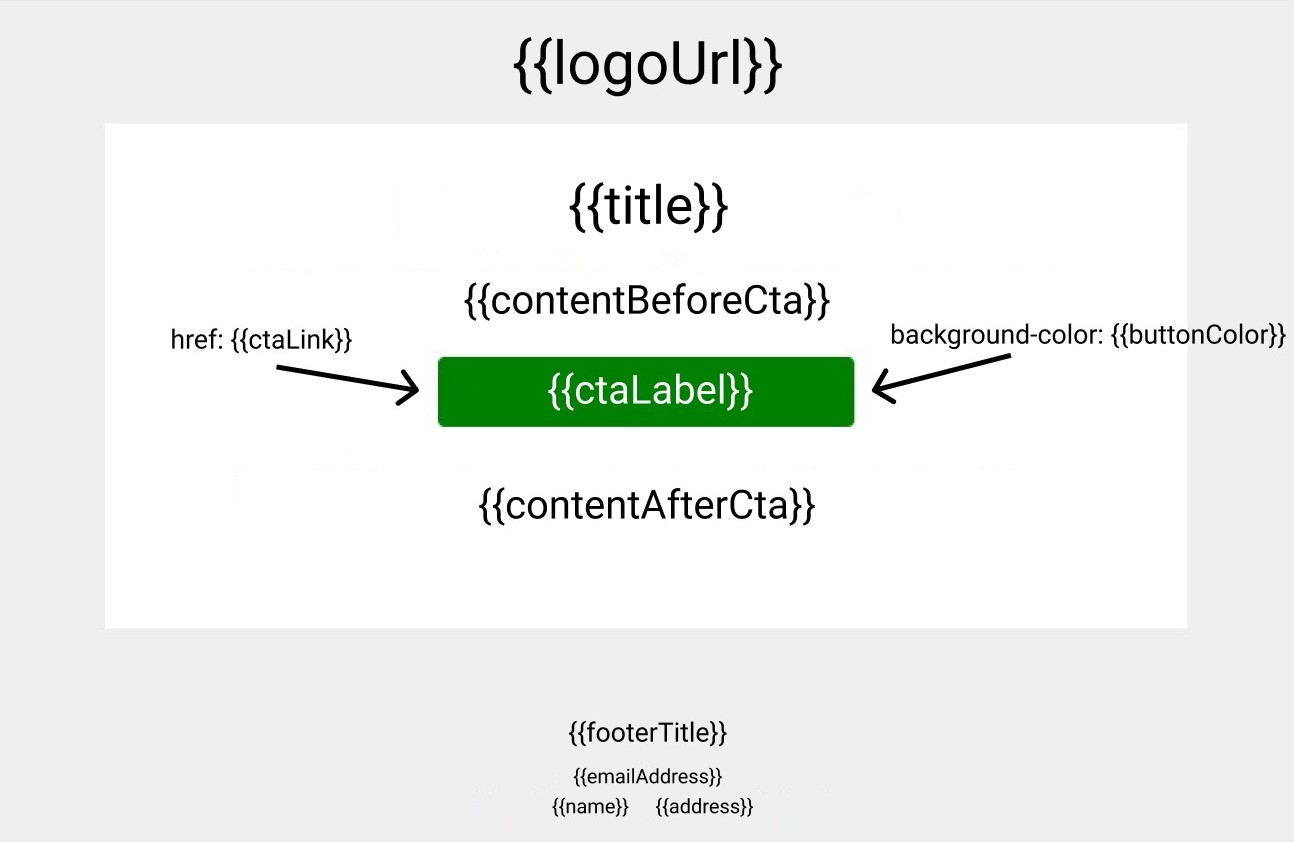
{
    name: string // From TENANT.name
    emailAddress: string // From TENANT.emailAddress
    address: string // From TENANT.address
    logoUrl: string // From TENANT.logoUrl
    textColor: string // From TENANT.emailConfig.template.textColor
    buttonColor: string // From TENANT.emailConfig.template.buttonColor
    subject: string // (Subject of the email) From TENANT.emailConfig.emailTypeConfig[EMAIL_TYPE].subject
    title: string // From TENANT.emailConfig.emailTypeConfig[EMAIL_TYPE].title
    contentBeforeCta: string // From TENANT.emailConfig.emailTypeConfig[EMAIL_TYPE].contentBeforeCta
    ctaLabel: string // From TENANT.emailConfig.emailTypeConfig[EMAIL_TYPE].ctaLabel
    ctaLink: string // From TENANT.emailConfig.emailTypeConfig[EMAIL_TYPE].ctaLink
    contentAfterCta: string // From TENANT.emailConfig.emailTypeConfig[EMAIL_TYPE].contentAfterCta
    footerTitle: string // From TENANT.emailConfig.emailTypeConfig[EMAIL_TYPE].footerTitle
}
Types
There're two types of emails.
Password reset
Sent after a user requested a password reset link.
EMAIL_TYPE: passwordReset
Triggered by endpoint: /users/forgotPassword
Can be customized by a tenant: Yes
Additional replacements
{
  resetToken: string // Token to reset the user password
  resetTokenExp: string // Reset token expiration date
}
Password reset successful
Sent after a password was successfully reset using a reset link.
EMAIL_TYPE: passwordResetSuccess
Triggered by endpoint: /users/resetPassword
Can be customized by a tenant: Yes
Additional replacements
None
Email confirmation
Sent after a user registered an account.
EMAIL_TYPE: emailConfirmation
Triggered by endpoint: POST /users/register
Can be customized by a tenant: Yes
Additional replacements
{
  emailConfirmationToken: string // Token to confirm the users' email address
}
Passwordless login
Sent after a user requested a login code/link.
EMAIL_TYPE: passwordlessLogin
Triggered by endpoint: POST /auth/passwordlessLogin/code
Can be customized by a tenant: No, not at the moment
Additional replacements
{
  loginCode: string // The code that can be exchanged into tokens
  loginLink: string // The constructed login link (http://example.test/?code=THE_LOGIN_CODE)
}
emailConfig
emailConfig holds the information about template settings and the emailTypeConfig(s)
template type
{
  buttonColor: string // HEX
  textColor: string // HEX
}
emailTypeConfig type
{
  [EMAIL_TYPE]: {
    subject: string // Subject of the email
    title: string
    contentBeforeCta: string
    ctaLabel: string
    ctaLink: string
    contentAfterCta: string
    footerTitle: string
  }
}
Saving the email configuration via the API
To populate the email settings, send a request to either POST /tenants or PATCH /tenants/TENANT_ID with a body like this:
{
  "name":"Tenant name",
  "emailAddress":"test@test.test",
  "address":"test street 00, city",
  "phoneNumber":"0000 000 000 000",
  "emailConfig": {
    "template": {
      "buttonColor":"#d64343",
      "textColor":"#d42525"
    },
    "emailTypeConfig": {
      "passwordReset": {
        "subject":"{{company.name}} Test reset",
        "title":"Test title",
        "contentBeforeCta":"text",
        "contentAfterCta":"text",
        "ctaLabel":"Label",
        "ctaLink":"http://test.test/{{resetToken}}",
        "footerTitle":"Footer"
      },
      "passwordResetSuccess": {
        "subject":"{{company.name}} Test reset",
        "title":"Test title",
        "contentBeforeCta":"text",
        "contentAfterCta":"text",
        "ctaLabel":"Label",
        "ctaLink":"http://test.test",
        "footerTitle":"Footer"
      }
    }
  }
}
tip
For all email type (BODY.emailTypeConfig[EMAIL_TYPE].*) settings, you can use {{}} to inject dynamic data.
Possible replacements are:
{
  currentTimestamp: Date
  currentDate: string // Example: 22nd, April 2022
  currentTime: string // Example: 12:00:00
  company: {
    name: string
    logoUrl: string
    address: string
    zipCode: string
    countryCode: string
    phoneNumber: string
    emailAddress: string
    senderEmail: string
  },
  user: {
    username: string
    displayname: string
    email: string
  }
}
Examples:
Top-level property: currentTimestamp
Nested property: company.name
For some types there is also additional data which you can find under "Types" -> "Additional replacements"
Send customized emails
To send a customized email add /tenants/YOUR_TENANT_ID in front of one of the endpoints you can find under "Types" -> "Triggered by endpoint".
caution
This will only work for users of that tenant.